 EmTech Media
Any · Windows
Slow internet? Run the five-minute test
Before you blame your ISP, prove where the slowdown actually is. Five minutes of testing separates 'bad router' from 'bad line'.
Before you start
Low risk. This change is reversible — you can return to the previous state without professional help or data loss.
Steps
- Close everything bandwidth-hungry (downloads, cloud sync, video calls), then run a speed test on speedtest.net — note download, upload and ping
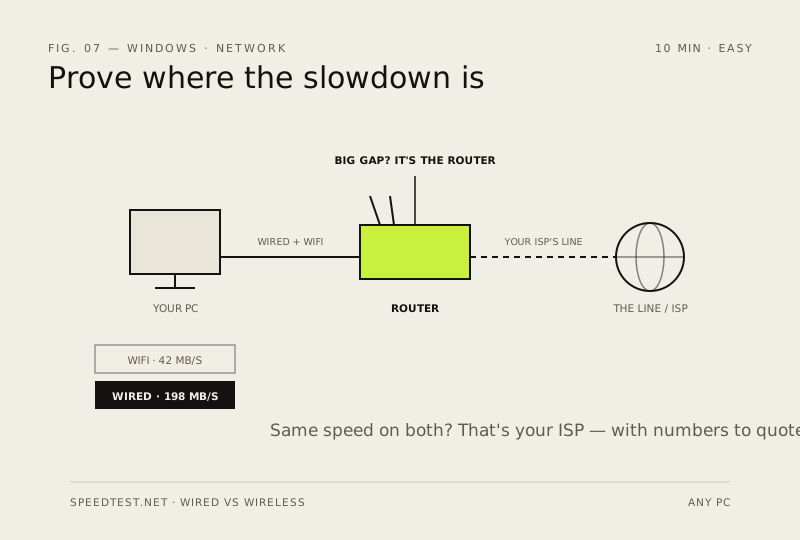
- Test wired vs Wi-Fi: plug in with Ethernet and re-test. A big gap means your router or its placement is the problem, not the line
- Move closer to the router or switch to the 5 GHz band (faster, shorter range); keep it off a shelf behind metal cabinets
- Reboot the router — months of uptime clog its memory; if speed returns for a week and then sags again, schedule a weekly reboot
- Still slow on both wired and Wi-Fi? That's your ISP's problem now — and you have numbers to quote them
How to verify the fix
You have wired vs Wi-Fi speed numbers, and the slower path is identified (router/placement vs ISP line).
If this didn't fix it
Both wired and Wi-Fi are slow — that's the ISP; quote them your recorded download/upload/ping figures.
Next stop: the related fixes below, or start a guided diagnosis.