 EmTech Media
Win 10 / 11 · Maintenance
Fix a PC that won't start up
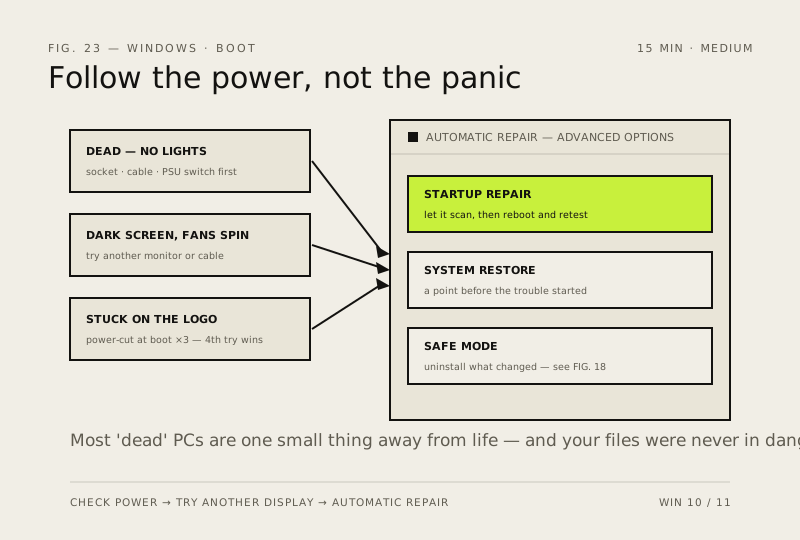
A dead screen at boot feels like a funeral for the machine, but most 'dead' PCs are one small thing away from life — and your files are still on the disk either way.
Before you start
Medium risk. This change is reversible — you can return to the previous state without professional help or data loss.
Steps
- Check the boring stuff first: wall socket, power cable, and that little O/I switch on the back of the PSU. Half of all 'dead PC' calls end here
- Hard reset it: hold the power button for 10 seconds, unplug (or pull the battery if you can), wait 30 seconds, then try again — stuck electrical states look exactly like death and die with them
- Fans spin but no display? Try another monitor or cable before touching the PC. On desktops make sure the screen is plugged into the graphics card, not the motherboard
- Stuck on the Windows logo: force it off (hold power 10 seconds) three times in a row — the fourth attempt opens Automatic Repair → Advanced options → Startup Repair, then System Restore if that declines
- Still dark? Boot Safe Mode from those same Advanced options and uninstall whatever changed — recent update first, new driver second. And before any reinstall: copy your files off the drive. Recovery is cheap; data loss isn't
How to verify the fix
The PC powers on and reaches the desktop (or Automatic Repair completes), with your files still accessible on the disk.
If this didn't fix it
Still dark after power checks, hard reset and monitor/cable swap — copy your files off before any reinstall; recovery is cheap, data loss isn't.
Next stop: the related fixes below, or start a guided diagnosis.